Adding CSS to HTML
There are three main ways to add (apply) CSS rules to an HTML document:
- Linking to external CSS file.
- Using an internal CSS stylesheet.
- Adding inline CSS rules directly to an HTML element.
Linking to external CSS file
The preferred way of applying CSS to an HTML document is to place all the CSS rules in an external .css file and then link this CSS file from the HTML page using the <link> element.
For example, we can place all CSS rules in a file named style.css:
h1 {
    color: green;
    font-size: 2.6rem;
}

p {
    color: #333;
    font-size: 1.5rem;
}
Then, in our index.html file, we use the <link> element to link this external stylesheet to our web page. The index.html file source code looks like the following:
<!DOCTYPE html>
<html lang="en">
<head>
    <meta charset="UTF-8">
    <meta name="viewport" content="width=device-width, initial-scale=1.0">
    <link rel="stylesheet" href="style.css">
    <title>My Page Title</title>
</head>
<body>
    <h1>This is an h1 title</h1>
    <p>This is paragraph text.</p>

</body>
</html>
The <link> element is placed inside the <head> section and has the following syntax:
<link rel="stylesheet" href="style.css">
This code links (imports, references) the external style.css stylesheet file to our HTML document. The rel attribute specifies the nature of the relationship between the linked CSS document and our HTML page. Since we are linking to a document whose type is stylesheet, the <rel> attribute's value is set to the "stylesheet" value. The href attribute specifies the path to our linked document, which in this case is simply the name of the external stylesheet file.
Now, all the CSS rules from the style.css file will be applied to our index.html page. This scenario assumes both the index.html and style.css files are placed inside the same folder:
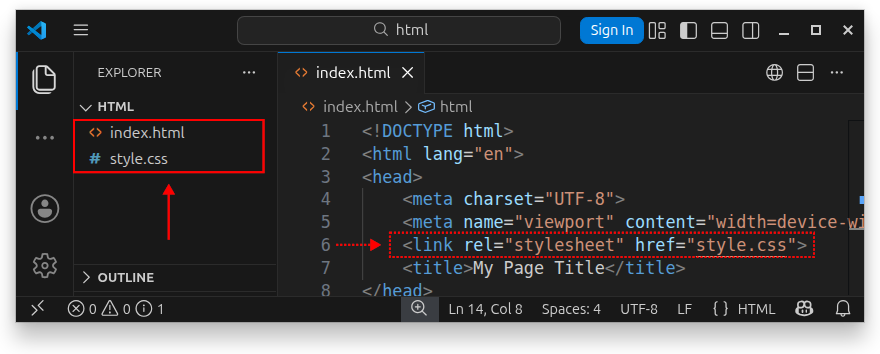
External stylesheets in a dedicated folder
If the style.css file is placed inside a css/ folder as in the following image:
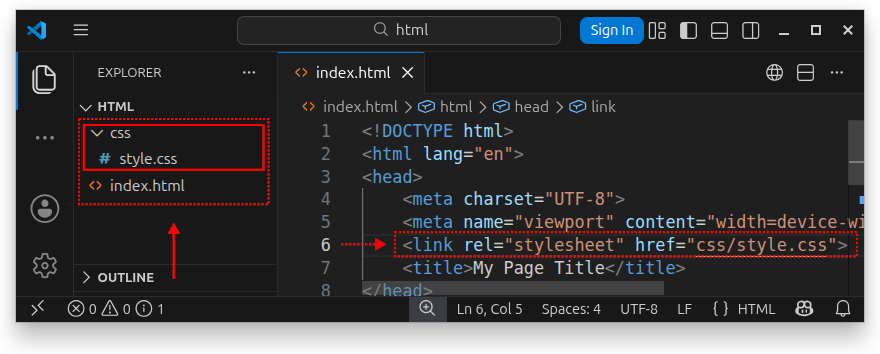
Then, we need to update the href attribute as follows:
<link rel="stylesheet" href="css/style.css">
In production, we can also add a web root path symbol (/) to our path:
<link rel="stylesheet" href="/css/style.css">
Note: It is an established practice to create a dedicated css/, styles/ or similarly named directory on our server and keep all external .css files there.
Applying multiple external stylesheets
To include (link to, import) multiple stylesheet files from our HTML file as in the following image:
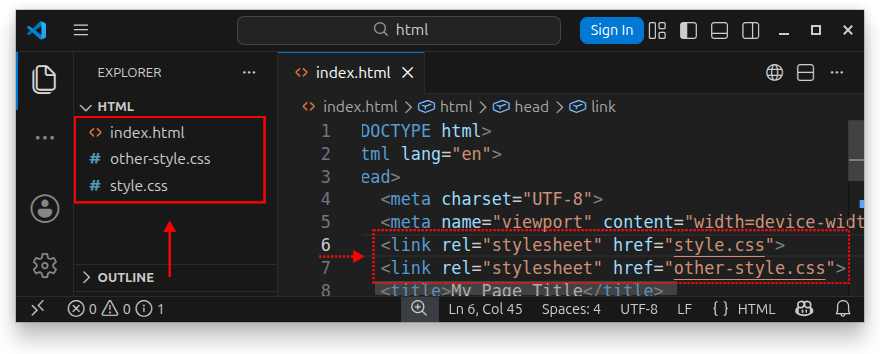
We use multiple <link> elements inside the <head> section:
<link rel="stylesheet" href="style.css">
<link rel="stylesheet" href="other-style.css">
The first <link> element imports the external style.css file, and the second <link> element links to the other-style.css file. Now, all the CSS rules from both style.css and other-style.css files will be applied to our index.html document.
The preferred way of applying CSS to HTML
Applying CSS styles to HTML by linking an external stylesheet (an external .css file) is the preferred way of applying CSS to our web page. It is a flexible way of organizing our CSS rules and keeping them in one or more external .css files. To update the CSS rules, we simply edit the rules in these .css files. This way, we can import the same CSS file to all our HTML pages.
Linking to an external stylesheet located on another website
We can also link to an external stylesheet hosted on another website/server by specifying the full URL (path to this file) using the href attribute:
<link rel="stylesheet" href="https://www.example.com/style.css">
Note: Replace https://www.example.com/style.css with the actual path to the external, remotely hosted .css file. The server these files are hosted on is often referred to as Content Delivery Network, or CDN for short.
Using internal stylesheet/styling
The second way of applying CSS rules to an HTML document is to use the so-called internal stylesheet. This means we specify all the CSS rules inside a <style> element placed inside the <head> section of the HTML document. Example:
<!DOCTYPE html>
<html lang="en">
<head>
    <meta charset="UTF-8">
    <meta name="viewport" content="width=device-width, initial-scale=1.0">
    <style>
        h1 {
            color: green;
            font-size: 2.6rem;
        }

        p {
            color: #333;
            font-size: 1.5rem;
        }
    </style>
    <title>My Page Title</title>
</head>
<body>
    <h1>This is an h1 title</h1>
    <p>This is paragraph text.</p>

</body>
</html>
All these CSS rules defined inside the <style> element are now automatically available and applied to our HTML document. This way of applying CSS is not the recommended way as it bloats our HTML code needlessly and makes our CSS less maintainable and organized. However, it can be a viable option if we need to modify or override the existing CSS rules from an external stylesheet, but cannot modify the external stylesheet directly.
Inline CSS styles
We can apply one or more CSS rules to a single HTML element by placing them inside the element's style attribute. The general syntax is:
<element_name style="property: value;">Element's content</element_name>
For example, to apply a color: green; CSS rule to an <h1> element, we write:
<h1 style="color: green;">This is an h1 title</h1>
To apply multiple inline CSS rules to our <h1> element, we place multiple declarations inside the style attribute and separate them with a semicolon (;) and a space for readability:
<h1 style="color: green; font-size: 2.6rem;">This is an h1 title</h1>
The use of inline CSS declarations is discouraged as it mixes HTML with CSS and makes our code less maintainable. As before, linking to an external CSS file is the preferred way to go when applying CSS to HTML.
Summary
When applying CSS to an HTML document, prefer the external stylesheet option, by keeping the CSS rules in an external .css file and linking to it from the HTML document using the <link> element:
<link rel="stylesheet" href="style.css">
It is also a good practice to create a dedicated style/, styles/, css/, or similarly named folder and keep all your .css files in this folder. In this case, update your path to an external stylesheet accordingly:
<link rel="stylesheet" href="css/style.css">
If we want to use the document root symbol (/) in our path, then we write:
<link rel="stylesheet" href="/css/style.css">


