CSS Overview
In this tutorial, we will explain what CSS is, how to include CSS in our web page, and what a CSS rule is made of.
Introduction
CSS or Cascading Style Sheets, is a rule-based language that specifies how HTML elements on our page look. For example, CSS can be used to set an element's font family, font size, background and foreground colors, margins, padding, borders, and more. Apart from the visual appearance of HTML elements, CSS can also be used to define layouts and animations.
The HTML code describes the structure and content of our web page, and CSS defines how that content looks like on a rendered page.
Including a CSS document in an HTML page
In production, we usually place all our CSS rules in a dedicated file and give this file a .css extension. For example, we can place all our CSS rules into a style.css file:
/* CSS rules go here */
And then we include (reference, link to) this style.css file in our HTML file using the <link> element placed inside the <head> section.
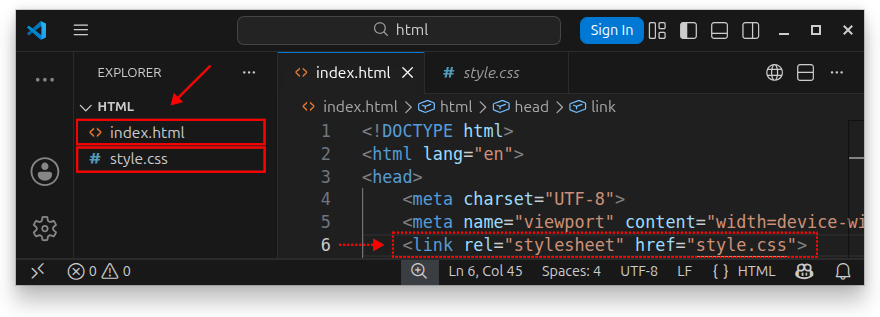
The full index.html source code is:
<!DOCTYPE html>
<html lang="en">
<head>
    <meta charset="UTF-8">
    <meta name="viewport" content="width=device-width, initial-scale=1.0">
    <link rel="stylesheet" href="style.css">
    <title>My Page Title</title>
</head>
<body>
    <h1>This is an h1 title</h1>
    <p>This is paragraph text.</p>

</body>
</html>
The <link> element is used to link (import, reference) the content of the stylesheet document to our HTML page:
<link rel="stylesheet" href="style.css">
The rel="stylesheet" attribute defines the relationship between the HTML document and the linked CSS stylesheet document as a stylesheet. The href attribute specifies the path to our stylesheet file. If the stylesheet file were placed inside a css/ folder, we would modify our path as follows:
<link rel="stylesheet" href="css/style.css">
If the style.css file were placed in some styles/ folder, the <link> element in our HTML file would look like the following:
<link rel="stylesheet" href="styles/style.css">
To resolve relative path issues in production, we can also add the document-root symbol (/) to our path:
<link rel="stylesheet" href="/styles/style.css">
Important: While learning CSS, we can keep both the CSS and HTML files in the same folder. In production, you should have a dedicated folder for your .css files on the server. Usually, you would create a css/, styles/, assets/, or similarly named folder and keep all your .css files there.
The CSS rule syntax
A CSS stylesheet document consists of one or more CSS rules. A CSS rule consists of several parts and has the following syntax:
selector_name {
    property_name: value;
}
The CSS rule consists of:
- A selector.
- A declaration block, represented by curly braces -
{}. - One or more
property: value;pairs declarations, each ending with a semicolon;.
The selector
The selector is used to select the HTML elements we want to style. For example, if we want to style all the <h2> elements on our page, the selector will be h2:
h2 {
    property_name: value;
}
If we want to style all the paragraphs on our web page, the selector becomes p:
p {
    property_name: value;
}
The declaration block
In a CSS rule, the declaration block follows after the selector and is enclosed in curly brackets {}. Inside the declaration block, we place one or more declarations. The general syntax for a CSS rule that defines one or more properties inside a declaration block is:
selector_name { /* This is the start of a declaration block */
    declaration_1;
    declaration_2;
} /* This is the end of a declaration block */
Declarations (property: value; pairs)
A declaration is a property: value; pair. The general syntax for a single declaration is:
selector_name {
    property_name: property_value; /* Declaration */
}
We choose a property from the list of existing predefined property names, type a colon (:) symbol followed by a space, and then we specify a value for that property. Finally, we end the entire declaration with a semicolon ; symbol.
Property names are predefined names from the list of CSS properties. Each property represents a different styling feature. For example, the following declaration:
h1 {
    color: green;
}
Defines a color property having the value of green. This property was declared in a CSS rule that selects the h1 element for styling. Now, our HTML page will display its h1 element styled with green text.
We can also have multiple declarations inside the declaration block, placed one after the other. The general syntax is:
selector_name {
    property_name_1: property_value_1; /* Declaration */
    property_name_2: property_value_2; /* Another declaration */
    /* More declarations here as needed */
}
Building on our previous example, we can now declare both color and, for example, font-size properties for our CSS rule that styles the h1 element:
h1 {
    color: green;
    font-size: 2.6rem;
}
This CSS rule now has two property: value; pairs in its declaration block. The first declaration specifies the text color via the color property, and the second specifies the font size in rem units via the font-size property. Now, our h1 element will have green text and a font size of 2.6rem units.
Note: Each property: value; pair declaration ends with a semicolon, but there is no semicolon placed after the declaration block {}.
Multiple CSS rules
Our CSS stylesheet can define multiple CSS rules by listing multiple selectors and their associated declaration blocks one after the other. The general syntax is:
/* The first CSS rule: */
selector_name_1 {
    property_name: value;
    /* More declarations here if needed */
}

/* The second CSS rule: */
selector_name_2 {
    property_name: value;
    /* More declarations here if needed */
}
For example, our style.css document can now have two rules-one CSS rule that targets (selects) the h1 element, and a second CSS rule that targets all paragraphs on our page:
h1 {
    color: green;
    font-size: 2.6rem;
}

p {
    color: #333;
    font-size: 1.5rem;
}
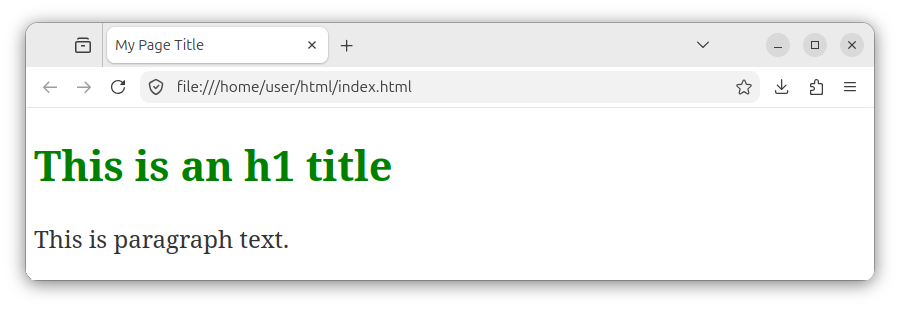
Now, our h1 element is green and has a font size of 2.6 rem units, and all paragraphs are styled as dark charcoal text (specified using the color property with a hexadecimal value of #333) with a font size of 1.5 rem:
The default CSS stylesheet
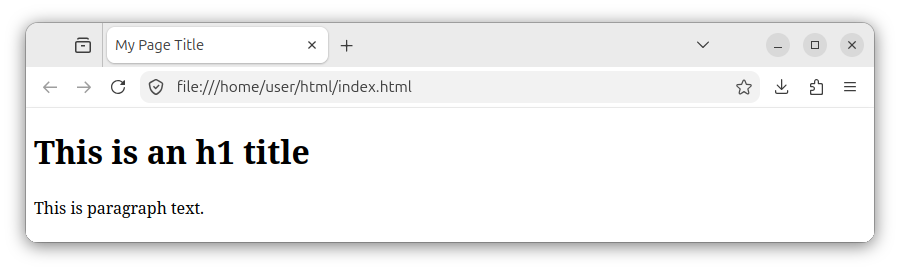
If we do not provide any custom CSS rules or link to any external CSS files, the browser will use its default, internal stylesheet rules to render the page. In that case, our index.html file will look similar to the following image:
Summary
In summary, CSS is made up of CSS rules, and each rule has a selector, a declaration block marked by braces: {}, and one or more property: value; declarations. We can place all the CSS rules inside a dedicated .css file and then link to it from our HTML document using the <link> element placed inside the <head> section.


