CSS Exercise - Linking to an External Stylesheet
Create an HTML page that links to (references, imports) an external CSS stylesheet file. Both the HTML file and the .css file are placed inside the same folder.
Solution
The index.html file:
<!DOCTYPE html>
<html lang="en">
<head>
    <meta charset="UTF-8">
    <meta name="viewport" content="width=device-width, initial-scale=1.0">
    <link rel="stylesheet" href="style.css">
    <title>My Page Title</title>
</head>
<body>
    <h1>This is an h1 title</h1>
    <p>This is paragraph text.</p>
    <div class="my-class">This is a div text.</div>

</body>
</html>
The style.css file:
body {
    font-family: Arial, Helvetica, sans-serif;
}

h1 {
    color: green;
}

p {
    color: #444444;
    font-size: 20px;
}

.my-class {
    color: darkcyan;
}
Explanation
The index.html file links to an external style.css file using the <link> element placed inside the <head> section:
<link rel="stylesheet" href="style.css">
The <link> element uses the href attribute to specify the path to an external .css file. Since both the HTML page and the style.css file are placed inside the same folder as in the following image:
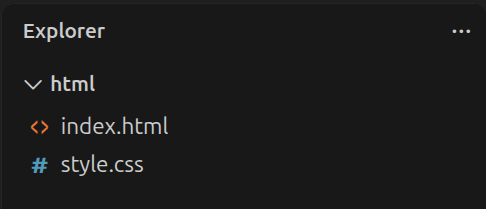
The relative path to a .css file is simply href="style.css". The <link> element also uses the rel="stylesheet" attribute to specify that the document we are linking to is a stylesheet file.
If the style.css file was placed inside some css/ dedicated folder as in the following image:
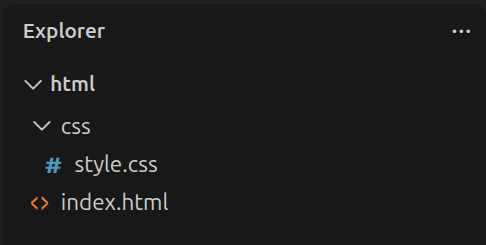
Our href relative path would be href="css/style.css". Example:
<link rel="stylesheet" href="css/style.css">
On a production server, we often include the document-root symbol (/) to our path as well:
<link rel="stylesheet" href="/style.css">
Or:
<link rel="stylesheet" href="/css/style.css">
Once we link to an external CSS file, all the CSS rules from that file are applied to our HTML document.
The style.css file has several sample CSS rules, which affect the appearance of body, h1, p and div elements on our page.
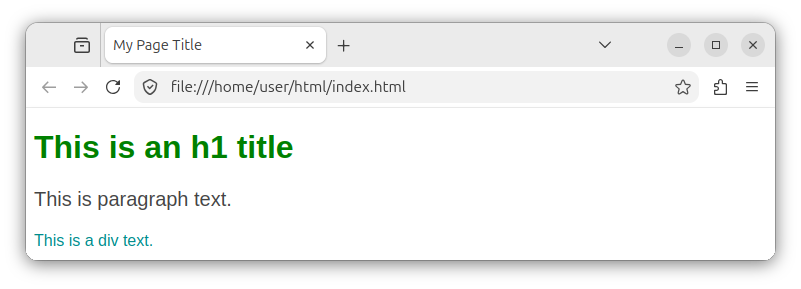
Note: If we wanted to include multiple CSS files in our HTML document, we would use multiple <link> elements in our HTML page's <head> section:
<head>
    <link rel="stylesheet" href="style.css">
    <link rel="stylesheet" href="other-style.css">
<head>
Note: For now, the actual CSS rules are for demonstration purposes only. We will cover these CSS rules details later in this CSS course.
For more information on different ways of including CSS styles in our HTML document, check out our Adding CSS to HTML tutorial.


