The color Property
To set an HTML element's text color, we use the color CSS property followed by a colon (:) and a color value. This property also sets the color for the text's underline and line-through decorations. For the most part, we use color to set the element's text color, not the element's complete inner content color.
The general syntax for a CSS rule that uses the color property is:
selector {
    color: value;
}
For example, to set the text color of all paragraphs to red, we write:
p {
    color: #ff0000; /* sets the text color to red for all paragraphs */
}
To set a red text color for a .my-class selector, we write:
.my-class {
    color: #ff0000; /* sets the text color to red */
}
Hexadecimal color values
Most of the time, we use hexadecimal color values starting with the # symbol, followed by hexadecimal values for the red, green, and blue colors/components. Example:
.my-class {
    color: #ff0000; /* sets the text color to red */
}
When we apply this CSS rule to an HTML element as in the following snippet:
<div class="my-class">This div's text is red.</div>
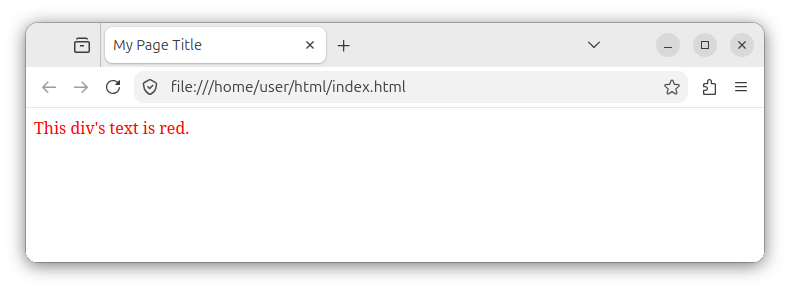
We see the following output in our browser, which renders a div element with red text:
The six hexadecimal digits inside the value of #ffffff represent the mix of three different segments, three different amounts (intensities) of red, green, and blue respectively.
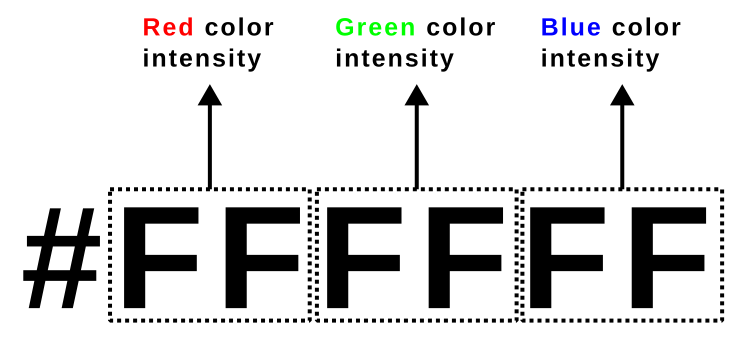
The first segment is made of the first two hexadecimal digits and represents the amount of red color in hexadecimal notation. The amount is within the 0 to 255 range, represented through the 00 to FF range as a hexadecimal number. The third and fourth digits represent the amount of green color, and the fifth and sixth digits represent the amount of blue color, also in the [0-255] range, which when represented as a hexadecimal number, can be any value from 00 (which represents 0 in decimal) to FF or ff (which represents the decimal number 255).
The entire mix of six digits represents the resulting color for our element, obtained through a mix of different amounts of red, green, and blue.
To set the text color to green using a hexadecimal value, we set the green segment to FF:
.my-class {
    color: #00FF00; /* sets the text color to green */
}
To achieve a yellow text color, we can combine the red and green segments:
.my-class {
    color: #FFFF00; /* sets the text color to yellow */
}
To achieve a dark gray color, we can combine all three colors with specific values:
.my-class {
    color: #333333; /* sets the text color to dark gray */
}
Note: In production, these hexadecimal values can also be lowercase:
.my-class {
    color: #ffff00; /* sets the text color to yellow */
}
Named color values
We can also use named color values. For example, the named constant red specifies a red color:
.my-class {
    color: red; /* sets the text color to red */
}
The named color value green will set the element's color to green:
.my-class {
    color: green; /* sets the text color to green */
}
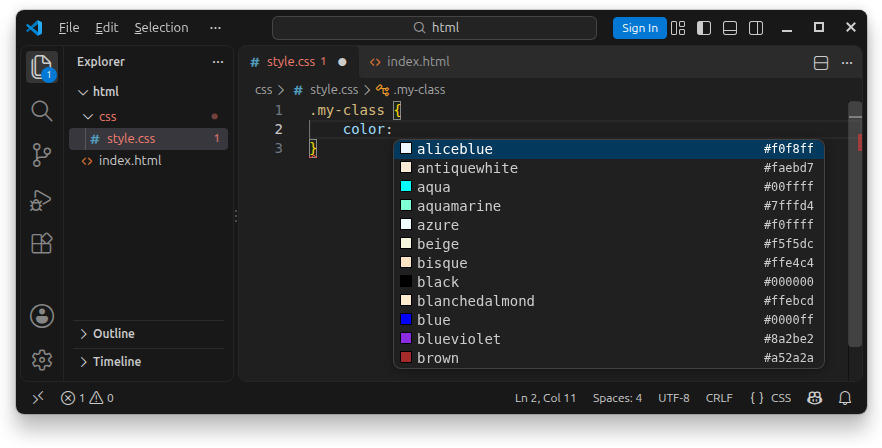
There is a plethora of named color values, and your IDE (text editor) is likely to list them all the moment you finish typing color: in your CSS code:
The rgb() function
The rgb() function accepts values for red, green and blue color channels and returns the resulting color. The general syntax is:
selector {
    color: rgb(red_val green_val blue_val / optional_alpha_val);
}
Each channel can have a value from 0 to 255. The following example uses the rgb() function to set the text color to red by setting the red channel to the maximum value of 255, and set both the green and blue channels to 0:
.my-class {
    color: rgb(255 0 0);
}
Note: In modern CSS, the arguments are separated by spaces, as in the example above, but they can also be separated with commas.
The values can also be represented using relative percentage values, ranging from 0% (equivalent to 0 in decimal) to 100% (equivalent to 255 in decimal) intensity.
The function can accept an optional fourth parameter that specifies the alpha channel intensity. The alpha channel parameter starts with the forward slash symbol (/), followed by an alpha channel value, which can be 0% (or a decimal number 0) for a fully transparent color, and 100% (or 1 in decimal) for a fully opaque color:
.my-class {
    color: rgb(255 0 0 / 50%); /* the same as rgb(255 0 0 / 0.5); */
}


