The <div> Element
The <div> element is a container element that can be used to logically group multiple elements together, define a layout, and create separate sections and subsections on our page.
The <div> element is used as a wrapper around multiple other HTML elements and divs, thus creating logical groups of elements and acting as a container for these elements.
General syntax
The general syntax for the <div> element is:
<div>
    <!-- Div's content (other html elements) here -->
</div>
The <div> element starts with the opening <div> tag, has a content that is usually made of other elements, and ends with a closing </div> tag.
The following example shows a <div> that has a single HTML element, such as a paragraph:
<div>
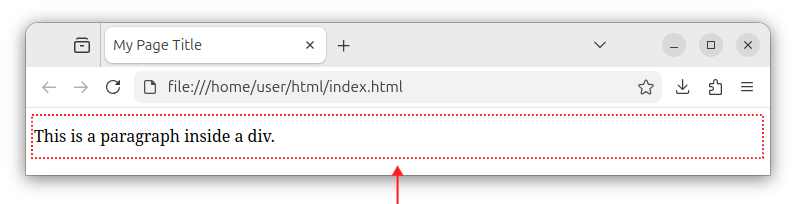
    <p>This is a paragraph inside a div.</p>
</div>
We can visualize this div as a rectangular (albeit invisible) area surrounding our paragraph:
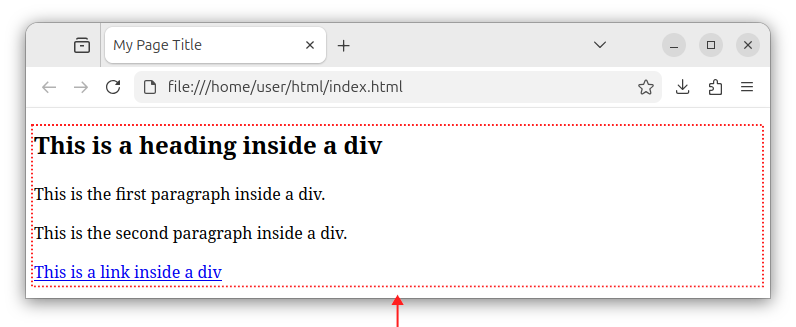
The <div> element can also contain multiple child elements. The following source code shows a <div> that has multiple HTML elements, for example, a heading, two paragraphs, and a link:
<div>
    <h2>This is a heading inside a div</h2>
    <p>This is the first paragraph inside a div.</p>
    <p>This is the second paragraph inside a div.</p>
    <a href="https://www.example.com">This is a link inside a div</a>
</div>
We can visualize this div that contains (wraps around) multiple HTML elements using the following image:
Attributes
The <div> element is usually identified and styled using the id and class attributes.
The id attribute
The <div> element can have an id attribute, set to some unique value. For example:
<div id="some-id">
    <!-- The div's content -->
</div>
The id attribute specifies a unique identifier value for an element. If there is only one specific div per page, for example, a div used to wrap the page content, we use the id attribute on it and set it to some "page-wrapper" or similar, but unique value. Example:
<div id="page-wrapper">
    <!-- The div's content -->
</div>
If we want to add CSS styling for this ID, in some CSS file or inline CSS code, we specify CSS rule(s) for this page-wrapper ID:
#page-wrapper {
    /* CSS rules for this ID */
}
The class attribute
More often, the <div> element comes with a class attribute. The class attribute specifies an existing CSS rule that will be applied to this div.
<div class="some-css-class">
    <!-- The div's content -->
</div>
This div specifies a CSS class rule that will be applied to it. The CSS class rule can come from an external CSS file or inline CSS code:
.some-css-class {
    /* CSS rules for this class */
}
The class attribute of the <div> element can also be used to access this div using JavaScript code, but more often, it is simply used to apply the CSS class rule to a div.
If we need to apply multiple CSS classes to our <div> element, we separate the CSS class names using spaces:
<div class="some-css-class another-css-class">
    <!-- The div's content -->
</div>
When to use id and class attributes?
If there is only one such div per page, use the id attribute. If there are multiple divs of the same kind that are repeated on the page and are (re-)using the same CSS rules, use a class attribute.
In production, usually there can be only one div (per page) that wraps the entire page content. In that case, we can opt to apply an id CSS rule to our div:
<div id="unique-page-wrapper">

</div>
There can also be multiple divs of the same kind that are repeated on the page, and they are reusing the same CSS class rules. In that case, we opt for a class attribute. Example:
<div class="repeating-div">

</div>

<div class="repeating-div">

</div>
Sections and subsections
A <div> element can contain one or more inner/children <div> elements, which allows us to create sections and subsections on our page or a complex HTML component. Example:
<div> <!-- Outer div -->
    <div> <!-- Inner div 1 -->

    </div><!-- Inner div 1 ends here -->

    <div> <!-- Inner div 2 -->

    </div><!-- Inner div 2 ends here -->

</div><!-- Outer div ends here -->
This way, we can divide the content on our page or our component into logical regions and subregions.
Using divs to create a layout
Multiple <div> elements can be used to create a layout for our page. They can, for example, be used to create a page wrapper container, left sidebar column, main content, and similar. Example:
<div id="wrapper">
    <div id="left-sidebar">

    </div>

    <div id="main-content">

    </div>
</div>
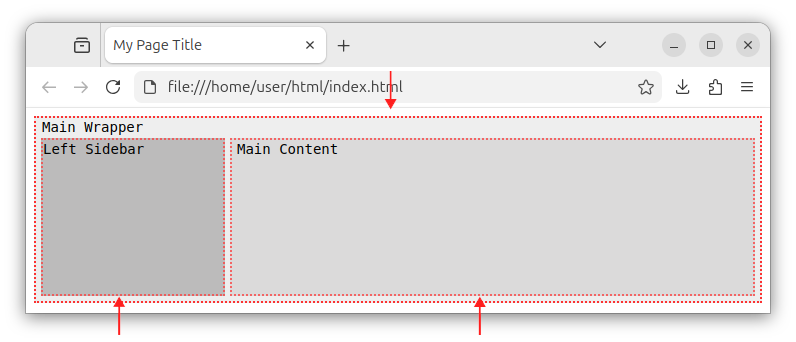
This code shows one major wrapper div (region, container), and inside that div, we can have a left-sidebar and the main-content regions marked by different div elements.
The above code can be visualized as in the following image:
In modern HTML5, when creating a page layout, prefer semantic elements over divs when creating headers, sidebars and main content wrappers. These elements are <header>, <nav>, <main>, <aside> and other elements we will cover later in this tutorial. These elements have semantic meaning, while divs themselves have no semantic meaning, they are just wrappers/containers. That being said, it is not an error if we do indeed use divs to define a page layout. In fact, many web pages today are still using divs to define a page structure.
In summary, the <div> element can be used to divide our page into separate logical regions. And each region can have its own set of subregions.
If needed, the <div> element can have both id and class attributes. Example:
<div id="some-id" class="some-css-class">

</div>
If divs of the same kind (having the same CSS rules) are repeated on the page, then we use the class attribute on those divs and not the id attribute. Example:
<div id="wrapper">
    <div class="repeating-div-rule">

    </div>

    <div class="repeating-div-rule">

    </div>
</div>
It would not be a mistake even if we used the class attribute for the wrapper div instead of an id:
<div class="wrapper">
    <div class="repeating-div-rule">

    </div>

    <div class="repeating-div-rule">

    </div>
</div>
But, if we know for sure that there will be only one such div per page, we usually use the id instead as it uniquely identifies that div:
<div id="wrapper">
    <!-- Other content (divs/elements) here -->
<div>
Using divs to create components
Divs can have multiple levels of nested divs. Example:
<div class="card">
    <div class="outer-wrapper">
        <div class="inner-wrapper">
            <div class="title-wrapper">

            </div><!-- title-wrapper ends here -->
            <div class="content-wrapper">

            </div><!-- content-wrapper ends here -->
        </div><!-- inner-wrapper ends here -->
    <div><!-- outer-wrapper ends here -->
</div><!-- card div ends here -->
This way, we can create a complex component on a page, for example, a product card. This component consists of several other subsections and HTML elements. We can use one <div> to wrap around the entire component and several inner <div> elements to represent separate sections of our component.
As we can see, nested divs can go several levels deep, as required by our design/layout. In production code, you will often see web pages that have five, ten or more levels of nested divs.
Summary
In summary, a <div> is an element that serves as a container for other elements and other divs. It can be used to logically group the content and specify the layout-the positioning of elements using CSS rules.
Divs are used to logically divide our page into several sections and subsections, allowing for easier layout, positioning, and grouping.


