Exercise - Common HTML Elements
In this exercise, we will create an HTML page that has several, common semantic HTML elements, listed one after the other.
Exercise text
Create an HTML page that has the following, common, semantic HTML elements:
- A level 1 heading -
<h1> - Several paragraphs -
<p> - A basic link element -
<a> - Two lists:
- An unordered list -
<ul> - And an ordered list -
<ol>
- An unordered list -
- An image element -
<img> - Strong and emphasized text elements -
<strong>and<em>
Solution
The index.html file:
<!DOCTYPE html>
<html lang="en">
<head>
    <meta charset="UTF-8">
    <meta name="viewport" content="width=device-width, initial-scale=1.0">
    <title>My Page Title</title>
</head>
<body>

    <!-- Level 1 heading (the h1 element) -->
    <h1>This is a h1 heading</h1>

    <!-- Paragraph (the p element) -->
    <p>This page shows several common HTML elements. This is the first paragraph on a page.</p>

    <!-- Paragraph -->
    <p>The following is an unordered list element:</p>

    <!-- Unordered list -->
    <ul>
        <li>This is the first item in an unordered list.</li>
        <li>The second list item.</li>
        <li>The third list item.</li>
    </ul>

    <!-- Paragraph -->
    <p>The following is an ordered list element:</p>

    <!-- Ordered list -->
    <ol>
        <li>This is the first item in an ordered list.</li>
        <li>Second item.</li>
        <li>Third item.</li>
    </ol>

    <!-- Paragraph -->
    <p>An image element:</p>

    <!-- An image element -->
    <img src="https://www.clearprogramming.net/images/logo.png" alt="Clear Programming Logo" width="100" height="100">

    <!-- Paragraph -->
    <p>A link element:</p>
    <!-- A link element -->
    <a href="https://www.example.com">This is a link element</a>

    <!-- A paragraph with strong and emphasized text -->
    <p>This paragraph has <strong>strong</strong> and <em>emphasized</em> text.</p>

</body>
</html>
Explanation
Our web page has several common HTML elements. The first element is a level 1 heading - the <h1> element:
<h1>This is a h1 heading</h1>
Note: There can be a maximum of only one level 1 heading element per page.
This element is followed by two separate paragraph elements, marked by multiple <p> elements:
<p>This page shows several common HTML elements. This is the first paragraph on a page.</p>
<p>The following is an unordered list element:</p>
An unordered list element, marked by <ul> tags, with three list item elements inside, marked by <li> tags:
<ul>
    <li>This is the first item in an unordered list.</li>
    <li>The second list item.</li>
    <li>The third list item.</li>
</ul>
Then, we have (another paragraph and) an ordered list, the <ol> element, with three list items inside:
<ol>
    <li>This is the first item in an ordered list.</li>
    <li>Second item.</li>
    <li>Third item.</li>
</ol>
Next, we have an image element, represented by a self-closing <img> tag:
<img src="https://www.clearprogramming.net/images/logo.png" alt="Clear Programming Logo" width="100" height="100">
This image is loaded from a live website for illustration purposes. If you want to load and display a local image, you will modify the src attribute and set a path (URL) to your local image:
<img src="your_path/your_image.png" alt="Your alt image text" width="your_image_width" height="your_image_height">
Next, our page has a link element, represented by the <a> element:
<a href="https://www.example.com">This is a link element</a>
And, finally, our page shows a paragraph with strong and emphasized text, marked (wrapped) by <strong> and <em> elements, respectively:
<p>This paragraph has <strong>strong</strong> and <em>emphasized</em> text.</p>
Summary
In this exercise, we practiced creating several, common HTML elements on a page. All these semantic HTML elements are listed one after the other inside the <body> section of our page. Once rendered in a browser, our page will look similar to the page in the following image:
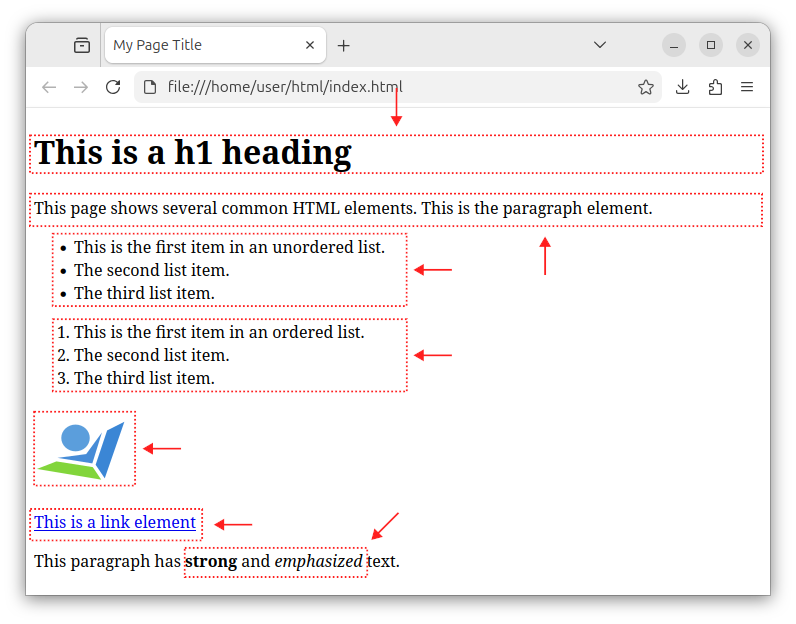
For more detailed information on these common elements, check out our headings, paragraphs, links, lists and images tutorials.
In our next exercise, we will create an HTML page with several different headings.


