The Meta Description Tag
The <meta> element can be used to specify various additional metadata values. In this tutorial, we will explain how to use the <meta> element to specify the description for our page.
The syntax
The <meta> element usually has name and content attributes. To specify the short description for our web page, we set the name attribute to the "description" value, and the content attribute to the text that represents the short description/summary of our web page.
The following HTML <meta> description snippet:
<meta name="description" content="A short description summarizing the content on this web page.">
Provides a description for our page. It provides a short summary of the content in our HTML page. All pages should have a meta description tag. The length of the description is free to choose, but you should aim at around 150 - 160 characters in length.
Note: Different pages on our website will have different meta description text.
Appearing in search results
The following mockup screen shows how a meta description text can appear in search engine results:
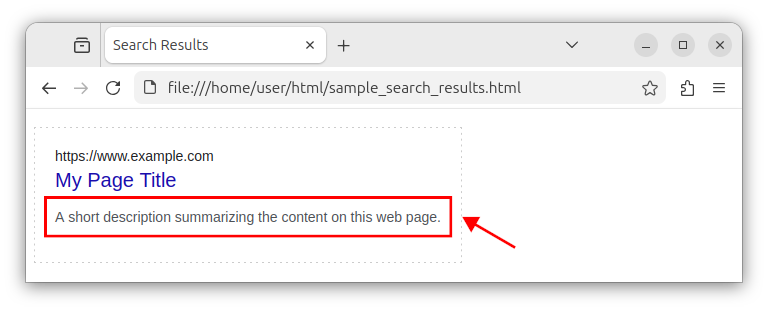
Important: Always include the meta description in all your pages. This metadata description is useful as it can appear in search engine results and in web browser bookmarks.
Part of other metadata
The <meta> element is also placed inside the <head> section along with other metadata elements:
<head>
    <meta charset="UTF-8">
    <meta name="viewport" content="width=device-width, initial-scale=1.0">
    <title>My Page Title</title>
    <meta name="description" content="A short description summarizing the content on this web page.">
</head>
Here, we opted to place the meta description tag after the <title> element. The order is not relevant, as long as we have in mind that the <meta charset="UTF-8"> element should come first.
The full index.html listing
And now, our index.html file looks like the following:
<!DOCTYPE html>
<html lang="en">
<head>
    <meta charset="UTF-8">
    <meta name="viewport" content="width=device-width, initial-scale=1.0">
    <title>My Page Title</title>
    <meta name="description" content="A short description summarizing the content on this web page.">
</head>
<body>

</body>
</html>
This code represents a more complete HTML page skeleton, the one that should be used in production. While not strictly required, it is highly recommended that you include the meta description element in all your web pages.


