Deleting a Record in Laravel
In this tutorial, we will learn how to delete a record from a table using the model's delete() method in Laravel.

The workflow
We will expand the framework from our previous tutorial and:
- Define a route /articles/{id} that receives the DELETE requests.
- Define a controller method that handles the route and deletes the record.
- Create a form that sends the DELETE request to a route.
Defining a route
Add the following statement at the end of our web.php file from the previous tutorial:
Route::delete('/articles/{id}', [ArticleController::class, 'destroy']);This code defines an /articles/{id} parametrized route that receives the DELETE requests. To define a route that receives a DELETE HTTP request, we used the Route::delete() function. This route will be handled by the controller's destroy() method, which we will create next.
Creating a controller's method
Open the ArticleController.php file from our previous tutorial, and add the following method to the ArticleController class:
// delete the record
public function destroy(string $id)
{
    // find the record by the id column
    $myArticle = Article::findOrFail($id);

    // delete the record/model
    $myArticle->delete();

    // redirect to the /articles route
    return redirect('/articles');
}
Explanation of the 'destroy' method
We defined a controller method we named destroy(). This method handles the /articles/{id} route when this route is accessed through a DELETE request. The method accepts a single $id parameter of type string. The $id parameter receives a value from the route's {id} parameter. The method uses that parameter to find a record to be deleted:
    // find the record by the id column
    $myArticle = Article::findOrFail($id);
Then, it deletes a record from a table, by invoking the model's delete() statement:
    // delete the record/model
    $myArticle->delete();
Finally, we redirect the user to the /articles route:
    // redirect to the /articles route
    return redirect('/articles');
Adding a form to the view
Open the index.blade.php template from our previous tutorial and paste the following code, overwriting the existing code:
<!DOCTYPE html>
<html lang="en">
<head>
    <meta charset="UTF-8">
    <title>Showing All Articles</title>
    <style>
        body { font-family: Arial; }
        table { border-collapse: collapse; }
        th, td { border: 1px solid #ccc; padding: 8px 12px; }
        th { background: #f5f5f5; }
        .actions a, .actions form { display: inline-block; margin: 0 5px; }

    </style>
</head>
<body>
    <h1>All Articles</h1>

    <table>
        <thead>
            <tr>
                <th>Id</th>
                <th>Title</th>
                <th>Text</th>
                <th>Created at</th>
                <th>Updated at</th>
                <th>Actions</th>
            </tr>
        </thead>
        <tbody>
            @foreach($myArticles as $article)
                <tr>
                    <td>{{ $article->id }}</td>
                    <td>{{ $article->title }}</td>
                    <td>{{ $article->article_text }}</td>
                    <td>{{ $article->created_at }}</td>
                    <td>{{ $article->updated_at }}</td>
                    <td class="actions">
                        <a href="/articles/{{ $article->id }}/edit">Edit</a>
                        <form action="/articles/{{ $article->id }}" method="POST" onsubmit="return confirm('Delete this article?');">
                            @csrf
                            @method('DELETE')
                            <button type="submit">Delete</button>
                        </form>
                    </td>
                </tr>
            @endforeach
        </tbody>
    </table>
</body>
</html>
The view/template now has a form with a Delete button for each record:
<form action="/articles/{{ $article->id }}" method="POST" onsubmit="return confirm('Delete this article?');">
    @csrf
    @method('DELETE')
    <button type="submit">Delete</button>
</form>
This form has a single Delete button which submits a form to a dynamically generated destination of /articles/{id}.
The form has a @csrf directive that protects our app from cross-site request forgery attacks.
@csrfWe also have a @method('DELETE') directive in our form, which spoofs/emulates the DELETE request. Since forms themselves can only send GET or POST requests, the presence of the @method('DELETE') method allows our Laravel app to send a DELETE request to the /articles/{id} route when we click the Delete button / submit the form:
@method('DELETE')When we reach the /articles/{id} route through the DELETE request, the controller's method destroy() gets executed. It deletes the record and then redirects us to the /articles route which displays all the records.
Note: We used a form to submit the DELETE request as regular anchor link cannot send a DELETE request.
Testing the deletions
When we access the /articles route through the http://127.0.0.1:8000/articles URL, we see the following results:
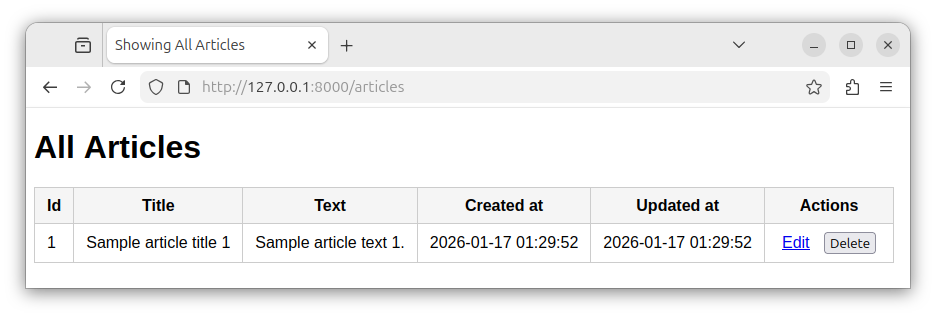
If the articles table had more than one record, our web page would display multiple records, with multiple Edit and Delete options, one for each record.
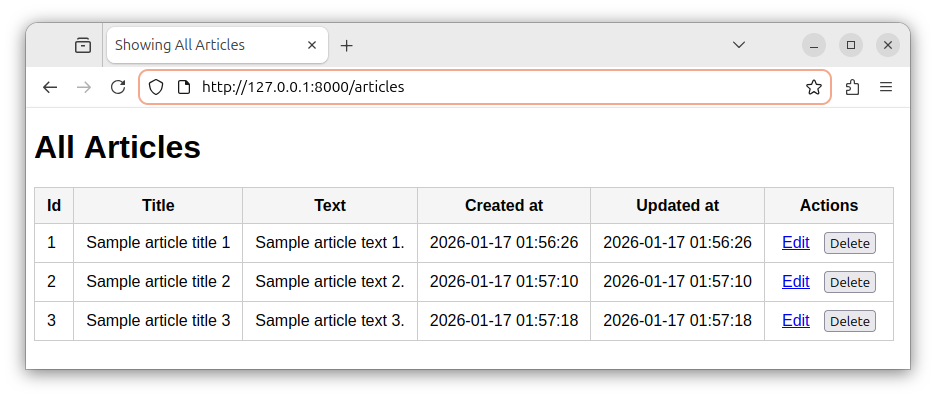
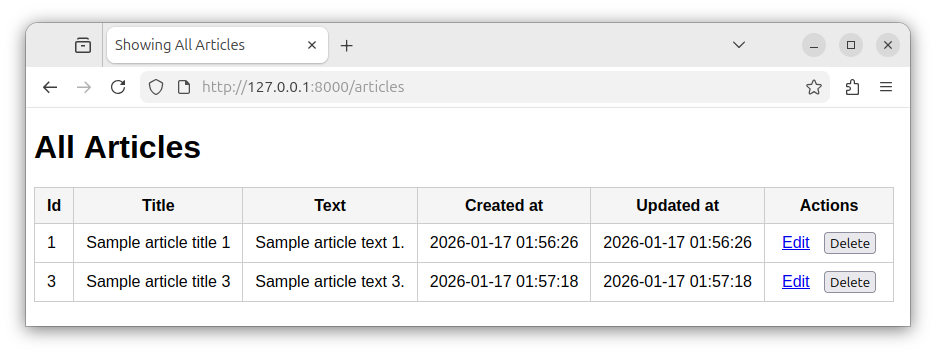
When we click one of the Delete buttons, we submit a form that makes a DELETE request to the /articles/{id} route. The /articles/{id} route deletes the record and redirects us back to the /articles route. If, for example, we click on the Delete button in the second row, the record with an id of 2 will be deleted from our table:
Other ways of deleting a record
Deleting a record through a query
We can also delete a record fetched through a query. To delete a record or multiple records that satisfy some query conditions, we perform a query on our model and then, at the end, invoke the model's delete() method. Assuming our model's name is Article, we write:
Article::where('id', 1)->delete();Note: Replace Article with your model's name.
Deleting all records in a table
To delete all records in a table, and preserve the next auto-incrementing ID value, we invoke an empty query() call, followed by a delete() method:
Article::query()->delete();Truncating a table
To truncate an entire table, and reset the auto-incrementing ID value, we call the truncate() method directly on a table model:
Article::truncate();This statement deletes all the records in an 'articles' table and resets the auto-incrementing ID column.
Summary
To delete a record/model, we use the model's delete() method to remove a record from a table. We also specify a deletion route that accepts DELETE request. And we use a form to submit a DELETE request to this route.


