Exercise - Returning a View/Template
In an existing Laravel app, define a single route and return a view containing the HTML code. Place the HTML code in a template file. Open the route in a browser and observe the rendered HTML page.
Create a single template file
First, we create a template file containing some HTML code. In Laravel, there are two ways of creating a template file:
Option 1 - Manually creating a template file
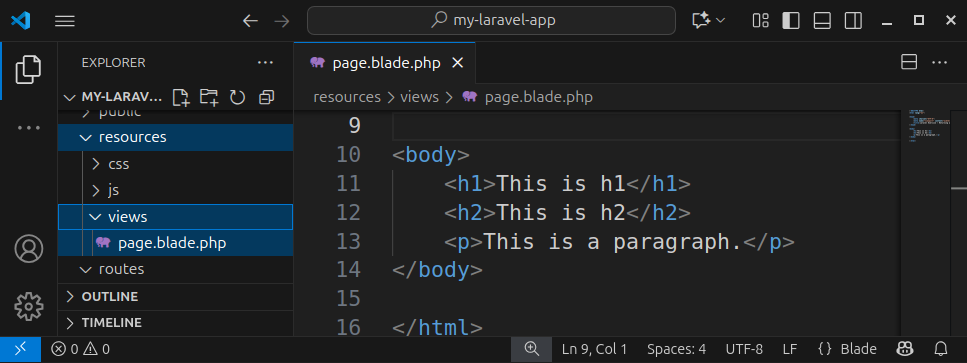
We can manually create an empty file, called for example, page.blade.php and place it inside the resources/views folder.
Open this template file, and paste the following HTML code:
<!DOCTYPE html>
<html lang="en">

<head>
    <meta charset="UTF-8">
    <meta name="viewport" content="width=device-width, initial-scale=1.0">
    <title>Laravel Exercise - Returning a View</title>
</head>

<body>
    <h1>This is h1</h1>
    <h2>This is h2</h2>
    <p>This is a paragraph.</p>
</body>

</html>
Save the template file.
Option 2 - Using php artisan to create a template file
We can use the artisan command-line tool to create an empty template file. Open a terminal and write:
php artisan make:view pageThis command will create an empty page.blade.php file and place it inside the resources/views folder. Open the file, paste the previously listed HTML code, and save the file.
Define a single route
In a web.php file, define a single route and return a view containing the HTML code from the page.blade.php template file:
Route::get('/', function () {
    return view('page');
});
Please note that the view() helper function accepts only the template name, without the .blade.php extension.
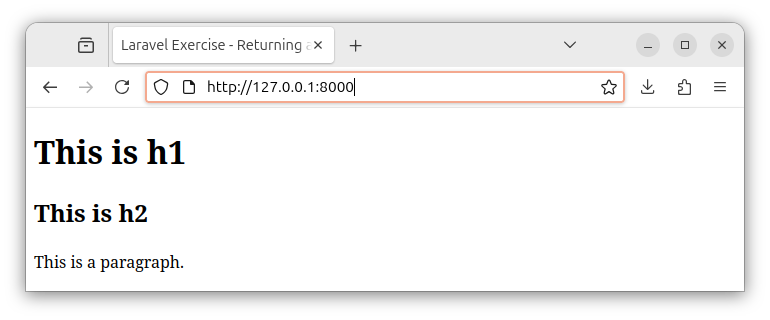
When we enter the base URL in a browser, the server returns a response containing the HTML and our browser renders the HTML code. This HTML code was returned by using the view() helper function which retrieved/rendered the HTML code stored in our template file.
Summary
In this exercise, we created a single template file containing some HTML code. We named this file page.blade.php. Template files have the .blade.php extension and are placed in a resources/views folder.
Inside our web.php file, we defined a single route and returned a view() helper function. This function retrieves/renders the HTML code stored in a template file.
In our next exercise, we will define multiple routes and return multiple views.


