Exercise - Using a Query to Fetch Some Records
Modify the source code from exercise 3.1. so that our Laravel app displays only those records whose id column value is greater than 1. The task requirements are:
- Reuse an existing Laravel project and start a local server.
- Reuse an articles table using a migration.
- Reuse an Article model.
- Use the Article model to build a query and return some records.
- Modify a view to display the id field too.
Creating a query
In our previous exercise, we displayed all the records from the articles table. In this exercise, we will fetch and display only those records that satisfy the query condition.
Modifying the web.php file
The only modification that needs to be done is inside the web.php file. Replace the following statement:
$myRecords = Article::all(); // fetch all the recordsWith the following statement:
$myRecords = Article::where('id', '>', 1)->get(); // fetch some records using a queryNow, our model Article uses a where clause/statement to build a query and a get() method to get the results of the query. The query returns only those records whose id column is greater than 1.
Modifying the view
Open the myview.blade.php template file from the resources/views folder and paste the following code, replacing the existing code:
<!DOCTYPE html>
<html lang="en">
<head>
    <meta charset="UTF-8">
    <meta name="viewport" content="width=device-width, initial-scale=1.0">
    <title>Laravel Exercise - Querying Records</title>
</head>
<body>
    <h1>Laravel exercise</h1>
    @foreach ($myRecords as $myRecord)
    <h2>Title: {{ $myRecord->title }}</h2>
    <h3>Id: {{ $myRecord->id }}</h3>
    <p>Text: {{ $myRecord->article_text }}</p>
    <p>Created at: {{ $myRecord->created_at }}</p>
    <p>Updated at: {{ $myRecord->updated_at }}</p>
    @endforeach
</body>
</html>
Our template file now also shows the value of the id column using the {{ $myRecord->id }} blade echo directive.
Now, if we access the http://127.0.0.1:8000 local address in our browser, we see the following results:
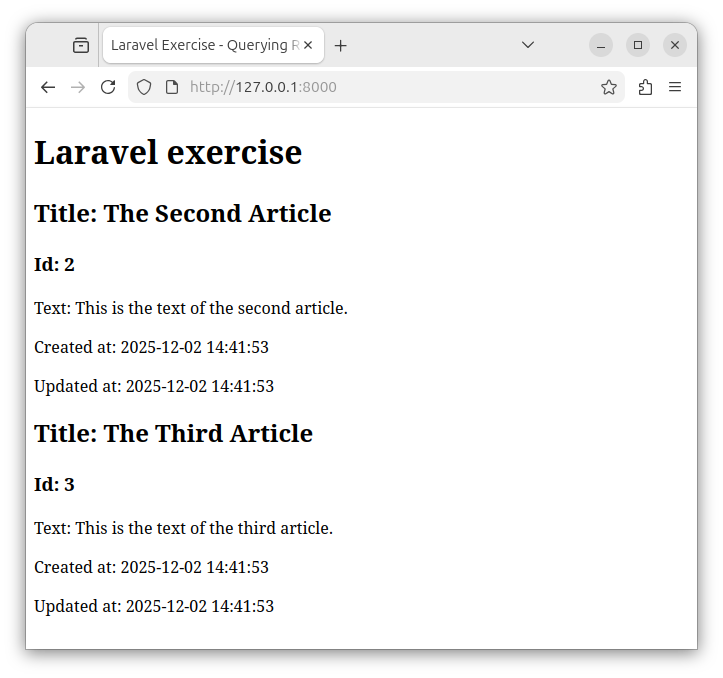
Summary
In this exercise, instead of returning all records, we returned only some records that satisfy the query condition. We used a simple where() clause to specify the condition and a get() method to get the result of the query. For more information on building queries in Laravel, check out our previous article: Models as Query Builders.
In our next exercises, we will build a master-detail table relationship and use models to specify those relationships.


