Using Models to Create Table Relationships
Database tables can have different kinds of relationships, such as one to one, one to many, many to one and similar. In Laravel, we can use models to specify/represent relationships between tables.
If we used raw SQL, we would use expressions like JOIN, LEFT JOIN, RIGHT JOIN and similar. In Laravel, we define relationships inside model classes. And the framework uses the model to build raw SQL queries behind the scenes.
The workflow
In this tutorial, we will go through steps to create, define, and utilize the relationship between two tables. The workflow is as follows:
- Create the master and details tables (posts and post_details tables, for example).
- Define columns for each table.
- Define a foreign key in the details table.
- Create models and define relationships.
- Use models to retrieve data.
- Display the data in a view.
Creating master-detail tables
Creating the master table (posts)
We will create a posts table which will act as a master table. In the shell, we create a migration file that will, in turn create a posts table:
php artisan make:migration create_posts_tableWe open the newly created migration file, which is named similar to 2025_10_25_123801_create_posts_table.php and paste the following code:
<?php

use Illuminate\Database\Migrations\Migration;
use Illuminate\Database\Schema\Blueprint;
use Illuminate\Support\Facades\Schema;

return new class extends Migration
{
    /**
     * Run the migrations.
     */
    public function up(): void
    {
        Schema::create('posts', function (Blueprint $table) {
            $table->id();
            $table->string('title');
            $table->timestamps();
        });
    }

    /**
     * Reverse the migrations.
     */
    public function down(): void
    {
        Schema::dropIfExists('posts');
    }
};
This code creates the posts table with the id, title, created_at, and updated_at columns.
Note: For more information on the up() and down() methods, check out our Introduction to Migrations tutorial.
Creating the details table (post_details)
Next, we create the post_details table which will serve as a detail table for the posts table. In the terminal we write:
php artisan make:migration create_post_details_tableWe open the newly created migration file whose name is similar to: 2025_11_14_162626_create_post_details_table.php and we replace the existing code with the following code:
<?php

use Illuminate\Database\Migrations\Migration;
use Illuminate\Database\Schema\Blueprint;
use Illuminate\Support\Facades\Schema;

return new class extends Migration
{
    /**
     * Run the migrations.
     */
    public function up(): void
    {
        Schema::create('post_details', function (Blueprint $table) {
            $table->id();
            $table->unsignedBigInteger('post_id'); // foreign key
            $table->text('post_text'); // a column for storing the post's text
            $table->timestamps();
        });
    }

    /**
     * Reverse the migrations.
     */
    public function down(): void
    {
        Schema::dropIfExists('post_details');
    }
};
This code creates a post_details table with several columns.
One of the important columns is the foreign key column named post_id. The following line in our code:
$table->unsignedBigInteger('post_id'); // foreign keyCreates a foreign key column, named post_id, which will enable us to form a relationship between the posts and the post_details tables. This will be a one-to-one relationship. For each record inside the posts table, there is exactly one record inside the post_details table. We say that each record in the posts table has one related record in the details (post_details) table.
The other important column is the post_text column which will hold the lengthy text for a post. This field is created through the following line in our schema:
$table->text('post_text'); // a column for storing the post's textCreating foreign keys and constraints
Alternatively, we can create a foreign key column by using the foreignId('table_id') method. The foreignId() method is an alias for creating the UNSIGNED BIGINT column. We write:
$table->foreignId('post_id'); // foreign keyOptionally, to apply foreign key constraints on a database level, we can chain the constrained() method to the above statement:
$table->foreignId('post_id')->constrained(); // foreign key with constraint
// that references the id column on a posts table
The constrained() method applies foreign key constraint on a column and uses naming conventions to automatically reference the id column on a posts table in our case. If the table names do not follow the naming conventions, we can manually provide the table name and column name being referenced as parameters:
$table->foreignId('post_id')->constrained(
    table: 'custom_table_name', indexName: 'custom_column_name'
); // constrained foreign key that references the custom_column_name column on a custom_table_name table
Creating models and relationships
Creating the Post model and a relationship
First, we create models for both tables and then, in each model, we specify the relationship it has with the other model/table. First, we create a Post model that represents the posts table. In the terminal, we write:
php artisan make:model PostWe open the newly created Post.php file and paste the following code, replacing any existing code:
<?php

namespace App\Models;

use Illuminate\Database\Eloquent\Model;
use Illuminate\Database\Eloquent\Relations\HasOne; // import the HasOne class

class Post extends Model
{

    // define a has-one relationship / get the post's text
    public function detail(): HasOne
    {
        return $this->hasOne(PostDetail::class);
    }
}
Inside our Post class we added the new public function, we named detail() of the HasOne type. This function specifies the relationship our post table will have with the post_details table. The function returns the hasOne() method which accepts the name of the related model class as a parameter. In our case, it will be the (yet to be created) PostDetail model class which represents the post_details table. The framework automatically assumes there is a foreign key with the name of parentname_id in the post_details table. In our case, there is a foreign key with the name of post_id in the details table. If this foreign key column had a different name, then we would provide a second parameter to our hasOne() function call and specify the foreign key name:
return $this->hasOne(PostDetail::class, 'custom_foreign_key_name');The detail() user-provided function specifies the relationship from the standpoint of the post table (of the Post model) in relation to the post_details table. It is used to get the related record(s) from the details table. We can name our relationship function differently, like detailPost or postDetail.
Note: Type hinting as in this line:
public function detail(): HasOneIs not strictly required and we can have a function without a return type:
    public function detail()
    {
        return $this->hasOne(PostDetail::class);
    }
But it is, nevertheless, advised to indeed have the type hinting for the relationship function as it constitutes good practice.
Creating the PostDetail model and a relationship
To create a PostDetail model that represents the post_details table, in the terminal, we execute the following command:
php artisan make:model PostDetailThen, we open the newly created PostDetail.php file and paste the following code, replacing any existing code:
<?php

namespace App\Models;

use Illuminate\Database\Eloquent\Model;
use Illuminate\Database\Eloquent\Relations\BelongsTo; // import the BelongsTo class

class PostDetail extends Model
{
    // define a belongs-to relationship
    public function post(): BelongsTo
    {
        return $this->belongsTo(Post::class);
    }
}
In our PostDetail model class, we provide a user-defined post() function that specifies the relationship from the standpoint of a post_details table (of a PostDetail model). We provide strong type hinting for this function and make it of type BelongsTo. Inside the function body, this time, we use the belongsTo() method and provide the name of the related master model class, which in our case is the Post class. Now, we are specifying the relationship from the standpoint of the post_details table. We say that each record in the details table belongs to the related record in the master posts table.
Relationships summary
In summary, the detail() function defined inside a Post model, specifies/defines a relationship the post table has with/in relation to the post_details table. It defines a relationship from the perspective of the post table (the Post model).
The post() function defined inside a PostDetail model, defines a relationship the post_details table has with the posts table. It defines a relationship from the perspective of the post_details table (the PostDetail model).
Inserting sample records
To quickly insert several sample records, we can use the artisan tinker tool. In the terminal, we execute the following command:
php artisan tinkerOnce inside the tinker tool, we execute the following commands:
DB::table('posts')->insert([
    ['title' => 'The first post', 'created_at' => now()],
    ['title' => 'The second post', 'created_at' => now()],
    ['title' => 'The third post', 'created_at' => now()],
]);

DB::table('post_details')->insert([
    ['post_id' => '1', 'post_text' => 'The details text for the first post.', 'created_at' => now()],
    ['post_id' => '2', 'post_text' => 'The details text for the second post.', 'created_at' => now()],
    ['post_id' => '3', 'post_text' => 'The details text for the third post.', 'created_at' => now()],
]);

exit;
These commands insert three sample records into the post and post_details tables, and exit the tool.
Fetching the data
Now we can fetch the records from the post and post_details tables and pass them to our view. We open the web.php file and paste the following code:
<?php

use App\Models\Post;
use Illuminate\Support\Facades\Route;

Route::get('/', function () {
    // get all the posts records with the corresponding details records
    $myPosts = Post::with('detail')->get(); // use eager loading for the detail relationship
    return view('myposts', ['myPosts' => $myPosts]); // pass data and return a view
});
The above code defines a base route, fetches the records and passes them to a view. To fetch all the master and detail records, we used the following statement:
Post::with('detail')->get();Notice that we did not use the Post::all() method to fetch all the records. If we used the Post::all() method to fetch all the master records and all the related records, we would run into the so-called N+1 problem. The N+1 problem says the framework will generate one query to fetch the master table records and N queries to fetch all the related details records. The workaround is to use the with('relationship_name') statement which fetches related records using eager loading and solves the N+1 problem. Inside the with() function, we specify which relationship we want eager loaded. In our case it is the 'detail' relationship defined earlier in the Post model. When using the with() statement for related tables, the framework will generate one query for the master records and one query for the details records. If we did not use eager loading through the with() statement, we would still fetch both the master and details records but through the inefficient N+1 number of queries.
A good rule of thumb is that when we have related tables, we fetch the data by including the with() function in our broader query. And within the with() function, we specify which relationship we want to be eager loaded.
Creating a view
Using a terminal, we will create a view, called myposts:
php artisan make:view mypostsWe open the newly created myposts.blade.php file and paste the following code:
<!DOCTYPE html>
<html lang="en">
<head>
    <meta charset="UTF-8">
    <meta name="viewport" content="width=device-width, initial-scale=1.0">
    <title>Master - Details Example</title>
    <style>
        body {
            font-size: 14px;
        }
  </style>

</head>
<body>

    @foreach($myPosts as $myPost)
        <h1>{{ $myPost->id }}</h1>
        <h2>{{ $myPost->title }}</h2>
        <p>{{ $myPost->detail->post_text }}</p>
    @endforeach

</body>
</html>
This code displays all the records from both the master posts table and the details post_details table in a loop. To access the related records from the post_details table, we use the previously defined detail relationship as a property of an object, followed by the record name we want displayed. In our case the related, post_text column is accessed through:
{{ $myPost->detail->post_text }}Now, if we access the local http://127.0.0.1:8000 address in our browser, we see the following output:
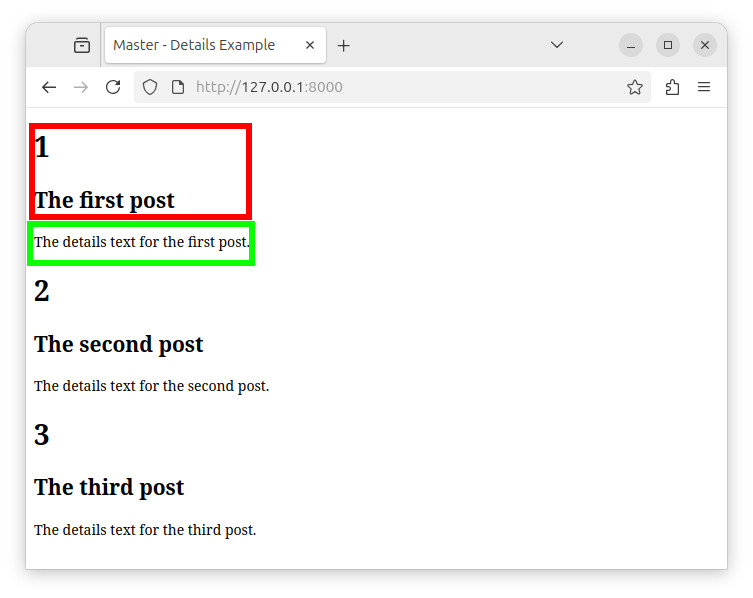
The fields inside the red rectangle originate from a posts table. The field inside the green rectangle comes from a post_details table and is fetched through a one-to-one (has-one) relationship, we named detail.
Summary
In Laravel, we represent relationships through user defined functions inside model classes. If a table is related to other tables, we specify the relationship in this table's Model class. If the table is related to multiple tables, then we specify multiple relationship methods. Then, by using the with() function, we perform the so-called eager loading and fetch the records. Finally, through a relationship, we access the related records and display them in our template files.


