Using Models to Build Queries
So far, we have used Models to fetch all table records using the all() method. In this tutorial, we will learn how to use Models as query builders.
In Laravel, we can also use Models to build queries. Instead of using raw SQL queries, we can use models to build database queries and return a result. By building and executing queries, we return only those records that fulfill certain requirements.
Note: Behind the scenes, the Laravel framework will use the Model to generate raw SQL queries.
The workflow
Using a model, we specify one or more query constraints and then use the get() method to get the result of this database query. We can use the following workflow to build a query and get the result:
    $myResults = MyModel::some_clause1(parameters) // invoke the first query clause
        ->some_clause2(parameters) // add (chain) another clause
        ->some_clause3(parameters) // add another clause
        ->get(); // get the result of the query
Usually, the first clause is a static method call using the :: operator:
$myResults = MyModel::some_clause1(parameters)This method call returns an object of an underlying query builder type, to which we can add/chain more clauses if needed using the -> operator:
->some_clause2(parameters) // add (chain) another clause
->some_clause3(parameters) // add another clause
Finally, we invoke the get() function at the end, to get the query results:
->get(); // get the result of the queryClauses - methods
Some of the frequently used clauses (methods) when building a query are:
where()
The where() method adds the "where" SQL clause equivalent to our query. The where() method accepts three parameters:
- The column name
- The operator
- The value to compare against
For example, to return only those records whose id column is greater than 2, we write:
$myResults = MyModel::where('id', '>', 2)->get();To return a record (or possibly multiple records) whose id column is equal to 2, we write:
$myResults = MyModel::where('id', '=', 2)->get();To add another AND condition to our where statement, we add/chain an additional where clause. For example, to return all records whose id column is greater than 2, and the age column is greater than 20, we write:
$myResults = MyModel::where('id', '>', 2)
    ->where('age', '>', 20)
    ->get();
pluck()
The pluck() statement returns a collection of values from a given column only. For example, if we want to get only the values from a name column, we write:
$myResults = MyModel::pluck('name');
// returns: ['Sample Name 1', 'Sample Name 2', 'Sample Name 3']
The second version of the pluck() statement returns a collection of key-value pairs. The key is the second argument and the value is the first argument. For example, to return a id => name, key-value pairs, we write:
$myResults = MyModel::pluck('name', 'id');
// returns: ['1' => 'Sample Name 1', '2' => 'Sample Name 2', '3' => 'Sample Name 3']
select()
The select() statement allows us to specify which columns we want returned. If we want to return only some columns, such as id and name, we write:
$myResults = MyModel::select('id', 'name')->get();orderBy()
The orderBy() method sorts the query results by a specified column name in an ascending or the descending order. The method accepts two parameters, the column name and the sorting order. The value of asc is used for ascending order, and the value of desc is used for descending order. For example, to sort the results by the name column, in an ascending order, we can write:
$myResults = MyModel::where('id', '>', 2)
    ->orderBy('name', 'asc')
    ->get();
Here, we used the orderBy() method as a chained clause, following some where() clause condition.
To sort by the name column in a descending order, we write:
$myResults = MyModel::where('id', '>', 2)
    ->orderBy('name', 'desc')
    ->get();
limit($number)
The limit($number) method limits the number of the query results to a specified number. To limit the number of returned records to 5, we can write:
$myResults = MyModel::where('id', '>', 2)
    ->limit(5) // limit the number of returned results/records to 5
    ->get();
Here, we used the limit() method as a chained method, following some where() method call.
Returning a single record
The following methods return a single record.
first()
The first() method returns a single record, a single row from a table. To use this method, we write:
$myResult = MyModel::where('name', '=', 'Sample Name')
    ->first() // return the first record whose name is equal to Sample Name
    ->get();
If there is no matching row, the first() method will return null, and we can perform a check:
$myResult = MyModel::where('name', '=', 'Sample Name')
    ->first() // return the first record whose name is equal to Sample Name
    ->get();
// check for null
if ($myResult) {
   // Found
} else {
   // Not found
}
firstOrFail()
The firstOrFail() method returns a single record from a table, if there is a matching record. If there is no matching record, this method raises an exception which results in a 404 Not Found HTTP response.
$myResults = MyModel::where('name', '=', 'Sample Name')
    ->firstOrFail() // return the first record whose name is equal to Sample Name or raise an exception
find($id)
The find($id) method returns a single row by searching the id column. If there is no matching row, the method will return null. To return a single record whose id column has a value 5, we write:
$myResult = MyModel::find(5); // search for a row whose id is equal to 5
// check for null
if ($myResult) {
   // Found
} else {
    // Not found
}
findOrFail($id)
The findOrFail($id) method returns a single row by searching the id column. If there is no matching row, the method will raise an exception, which, if not handled, causes the 404 Not Found response . To return a single record whose id column has a value 5, we write:
$myResult = MyModel::findOrFail(5); // search for a row whose id is equal to 5
// if not found, raise an exception (return the 404 HTTP response)
}
Usage example
In this example, we will build a query and display the results in a browser. We can reuse the posts table from our previous tutorial.
This time, we will use a model to build a query that returns only those records whose id column is greater than 1, the results will be sorted by the created_at column and we will limit the number of returned records to two. We paste the following code to our web.php file:
<?php

use App\Models\Post; // import the Post class (from the App\Models namespace)
use Illuminate\Support\Facades\Route; // import the Route facade

Route::get('/', function () { // define a route and build a query
    $myPosts = Post::where('id', '>', 1) // apply the where clause
    ->orderBy('created_at', 'asc') // apply the orderby clause
    ->limit(2) // apply the limit clause
    ->get(); // get the query result
    return view('myview', ['myPosts' => $myPosts]); // pass the records and return a view
});
Inside our web.php file, we used a model to build a query that has the where, orderBy and limit clauses. The result of this query will be stored in the $myPosts variable and then we pass this variable to the previously created myview.blade.php template.
We can now open the previously created myview.blade.php template and modify its code so that it now displays the id, title, post_text and created_at columns. The complete source code for the template file is:
<!DOCTYPE html>
<html lang="en">
<head>
    <meta charset="UTF-8">
    <meta name="viewport" content="width=device-width, initial-scale=1.0">
    <title>Using a Model to build queries</title>
</head>
<body>

    @foreach($myPosts as $myPost)
        <h1>Id: {{ $myPost->id }}</h1>
        <h2>Post title: {{ $myPost->title }}</h2>
        <p>Post text: {{ $myPost->post_text }}</p>
        <p>Created at: {{ $myPost->created_at }}</p>

    @endforeach

</body>
</html>
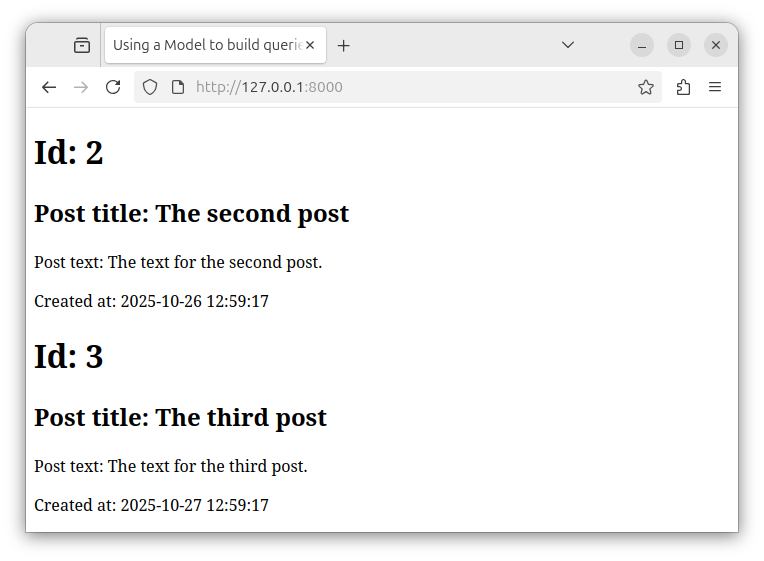
If we open the local http://127.0.0.1:800 URL in a web browser, we see the output of our query. Now, our page shows only those records that were returned by our query.
Summary
In Laravel, instead of using raw SQL queries, we mainly use Models to build queries. We use Models to build the equivalent of raw SQL queries. And the Laravel framework will use the Model's code to generate the actual SQL query that gets applied to database records. Using a Model, we build a query by adding query clauses and then use the get() method to get the results of that database query.


