Settings and Environment Variables
Configuration settings
Laravel application stores configuration settings such as the database connection, user credentials and other settings across multiple configuration files. These configuration files read/obtain the settings from one centralized file called the .env file.
The .env file
The .env file is a text file located inside the root folder of our application. The .env file contains several environment variables with certain values. By changing the values of these variables inside the .env file and saving the .env file, we can change/set the database name, the username, password and similar.
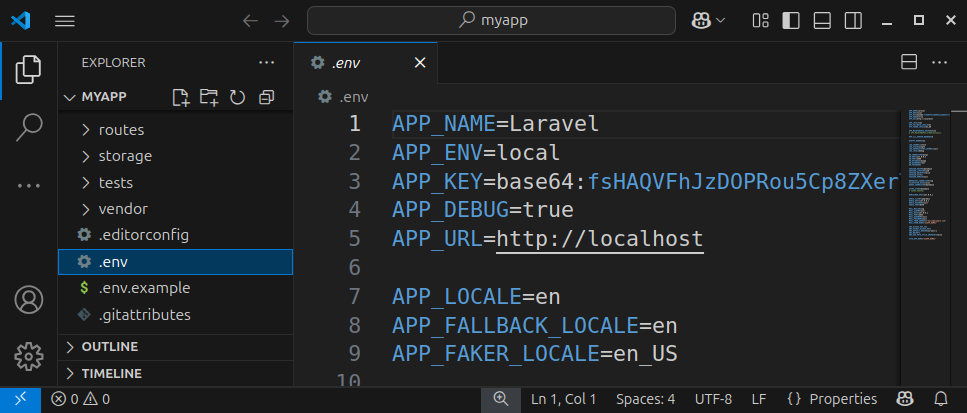
Let us explain some of the most widely-used environment variables inside the .env file.
The APP_NAME variable
The APP_NAME variable represents our application name. This is the project's internal name that will be displayed during the debugging process. By default, it is set to LARAVEL but we can change it to MyApp for example:
APP_NAME=MyAppIf the value contains spaces, it should be wrapped with double quotes:
APP_NAME="My App"The APP_NAME variable
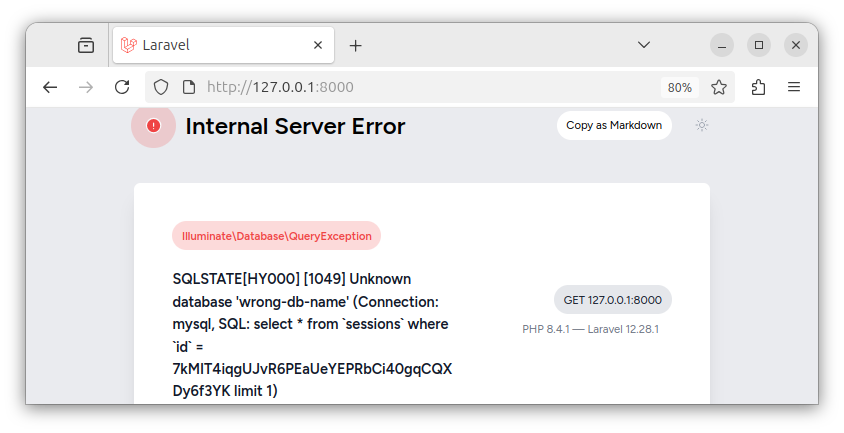
The APP_DEBUG environment variable can have the value of true or false. This setting specifies how much information will be displayed in case an error occurs in our application. When set to true, and an error occurs, the application will display a detailed error message, like in the image below.
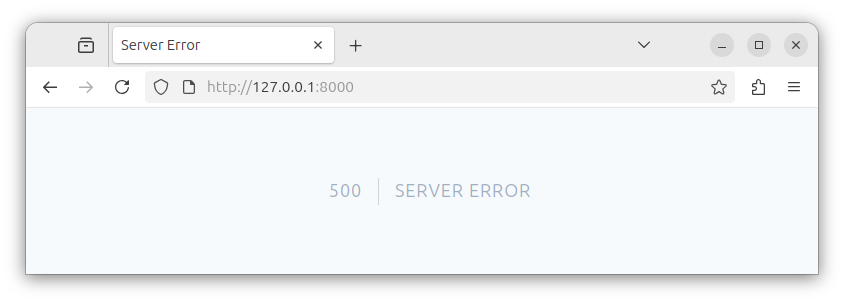
If the APP_DEBUG variable is set to false, the application will display only the generic error message.
While developing an application on a local server, we want this setting to be true because we want to see as much info as possible.
APP_DEBUG=trueWhen we deploy our Laravel project to a live server, we want to set this variable to false:
APP_DEBUG=falseAs we want to hide the potentially sensitive error details from reaching the users of our website.
The APP_URL variable
The APP_URL variable sets the URL of our web application. During development, it can be set to:
APP_URL=http://localhostIn production, it should be set to the actual website URL:
APP_URL=https://www.example.comReplace example.com with your actual website name.
The database-related settings
The .env file has a section dedicated to database and database credentials settings. By changing the values of these environment variables, we can specify various database-related parameters for our app.
The DB_CONNECTION variable
The DB_CONNECTION variable specifies the database connection type (the database engine) being used by our application. Since we opted to use the MySQL database, this variable is set to:
DB_CONNECTION=mysqlIf we want to use the SQLite database, we would change the DB_CONNECTION's value to sqlite:
DB_CONNECTION=sqliteTo use the MariaDB database connection, we write:
DB_CONNECTION=mariadbTo use the SQL Server, we write:
DB_CONNECTION=sqlsrvAnd, if we want to use PostgreSQL database, we would write:
DB_CONNECTION=pgsqlThe DB_HOST variable
The DB_HOST variable specifies the database host URL address or IP address. This setting can be set to 127.0.0.1 on both the local and production machines:
DB_HOST=127.0.0.1The DB_PORT variable
The DB_PORT variable sets the value of the port being used to connect to our variable. On a local machine it is usually set to:
DB_PORT=3306When deploying an application to a live server, check with your hosting company about the real port number being used.
The DB_DATABASE variable
The DB_DATABASE variable specifies the database name being used by our application. Earlier, we created a MySQL database with the name of myapp, so we can set it to:
DB_DATABASE=myappIf you created a database with a different name, for example, mydb, you can set it here:
DB_DATABASE=mydbPlease note that DB_CONNECTION and DB_DATABASE are two different things/settings. The DB_CONNECTION specifies the database connection/engine being used, and the DB_DATABASE specifies the actual database name within that database engine.
The DB_USERNAME variable
The DB_USERNAME variable specifies the username for the account used to connect to a database. By default, it was set to root when we created our Laravel app:
DB_USERNAME=rootIf you have a different username for a database you would specify it here.
DB_USERNAME=another_usernameThe DB_PASSWORD variable
The DB_PASSWORD variable specifies the password being used to connect to our database. A password for the previously defined user. By default, it is empty:
DB_PASSWORD=But, in production, you should create a user account with a strong password, and specify the password here:
DB_PASSWORD=some_strong_passwordSummary
In summary, we edit the values inside the .env file to change/set various application settings.
Please note that the .env file contains sensitive information and this file should not be visible/accessible to the visitors of our website. This file is also not committed to source control, but is usually manually created on the remote server using the .env.example file as a blueprint.
In our next tutorial, we will learn about routes and create a simple Hello World application.


